Monday, April 09, 2012

Never late: My IATEFL reflections

The Scottish Exhibition and Conference Centre
Well, after more than a week, and since it’s never late, I’d like to summarize my IATEFL experience in Glasgow as a participant and speaker. I hope it will encapsulate not only what I got in terms of knowledge but what it meant to have met a warmth and friendly PLN.

First day (March 19th)
LTSIG Pre-conference Event: Challenges and limitations in MALL


Even though I am not using mobile technology as much as I would like to in the classroom (I have used it for some other academic activities: announcing meetings, recording  events, contacting speakers). Also, it’s true I have used it in an online course I moderate for the British Council (Learning Technologies (LTs) for the Classroom course)  to send task  or WizIQ session reminders,  but once again not as part of the tools participants should use to become familiar with mlearning. My first impression on this pre-conference: its organization and far as I understand Graham Stanley was behind all this. Kudos! One of the things I found interesting while I was listening to speakers about MALL (Mobile Assisted Language Learning) is that my PLN  does keep me well informed on what’s going on about mlearning (just read the e-Moderation Station and you will see what I am talking about). By the way, Shelly Terrell referred to this in her eloquent presentation called Evolution of the conference: the internet's impact on professional development. However, there's no denial that there's always something new to learn and reflect upon from F2F conferences. The short but rich participation of the speakers in this LTSIG pre-conference kept us all glue to our seats them -figuratively speaking- throwing at us valuable key phrases, notions, insights that  complemented or added new information about mlearning. Just from Gavin Dudeney and Gary Motteram I got some that are still swirling in my head sort of accommodating, complementing, and expanding what I have heard/read about tablets and smartphones before.  Here they are in the shape of a word cloud:


Another thing mentioned in this pre-conference that called my attention was the use of  ESL-EFL apps in contrast with the use of rich media content (Youtube, Skype). It seems to be the latter may have a more positive effect on language learning than the first one. This might be true. However, I still believe, and might be wrong about it, this is not a decision to be made by the teacher only. I am almost certain some EFL students would appreciate a dose of apps to practice grammar and vocabulary on their smartphones or tablets. I do remember showing this Wordshake app to a group of students and they were fascinated by it. As an EFL learner myself, I’d never discard apps or "discreet" exercises that may help in one way or another to practice something about the target language.

My reflections/questions at the end of this valuable pre-conference revolved around how willing an EFL teacher from my country (Venezuela) could be in integrating mobile devices (smartphones and tablets) in his/her classroom. I reckon this  will depend on certain issues like safety (Is it safe for students / teacher  to carry their own devices to the classroom?); affordability (Can all students/teachers afford having a mobile device? What the BYOD?); connectivity (Is there wireless or decent broadband connection at school/university?);  compatibility (Can you use same apps or any other content rich media in all mobile devices?); training (Are all teachers willing to use and/or be trained to learn how to use mobile devices in the classroom?); pedagogy (Are there clear examples on the use of mobile devices in language learning?).  For my part, I finally managed to get a smartphone last year. I am exploring apps and how to use them first (before taking the plunge into integrating mobile devices in my EAP class), although I am really tempted to try one of the activities suggested by Nicky Hockly in her blog e-moderation station


Here you can have a peek at Gavin Dudeney's and Gary Moterram's presentations. You can also check out: Challenges and limitations of MALL, Twitter Summary
     
Next days: Tuesday 20th, Wednesday 21st, Thursday 22nd, Friday 23rd
Presentations

Some of the presentations I attended and enjoyed/learned a lot during these days were:

1.How to Reflect on Research Talks at the Conference. Simon Borg
2.It’s all very well in theory, but... Penny Ur
3.Technology speaks volumes: enhancing integration, participation and speaking abilities. Bruno Andrade
4.52: a year of subversive activity for the ELT classroom.  Lindsay Clandfield  & Luke Meddings
5.Tools for digital storytelling. Russell Stannard
6.Who needs a teacher’s book? Olwyn Alexander
7.Dialogue in teacher training: a sociocultural perspective. Willy Cardoso
8.How to create a Personal Learning Network (PLN). Nik Peachey
9.What’s in your blended teaching toolkit? Valentina Dodge
10.Teaching English in technologically-challenged environments. Dafne Gonzalez & Rubena St. Louis
11.Teaching Business English with technology in Latin America. Jennifer Verschoor
12.Evolution of the conference: the internet's impact on professional development. Shelly Terrell
13.What has #hashtagging ever done for us?Shaun Wilden
14.ELTCHAT and reflective teaching. Sharon Hartle
15.Continuous professional development through social networking. Barbara Hoskins Sakamoto
16.Creating your own interest-driven professional development path using social media. Bernadette Wall
17.TeCH-achers: get your one-way ticket to tech islands!. Isil Boy & Beyza Nur Yilmaz
18.No words: ideas for using sound and images in class. Michael Harrison
19.Supporting the teacher as innovative learning design. Diana Laurillard (Plenary)
 

SECC-Clyde Auditorium
As for my presentation, well, it was a really interesting, bit nerve-racking experience. I may not knock it out of the park, but all in all I think it was an important lesson as part of my professional development. Talking for the first time in an International event like IATEFL F2F to ESL-EFL teachers was really something. And I am still thankful to the British Council for having given the chance to participate in this event.  A small, but nice crowd attended my presentation among them Russell Stunnard (really supportive and a super great person - speaks Spanish amazingly fluently!), Sue-Lyon Jones (what a nice and lovely Lady!), Vicky Samuell (kind and sweet), María Muller (Nik Peachey’s wife – so great to have a Venezuelan listening to my presentation) . I do, do really thank them for having attended my session (the sound for videos didn't work, but was able to finish it just in time!). Last but not least, it was great to have had Luz Ortuñoz (British Council Project Officer in Venezuela) helping during this presentation and Carlos Mayora’s participation from Universidad Simón Bolívar. My presentation was called Technologies for ELT learning in Venezuela: Benefits of Screencasting and was presented on a Wednesday afternoon in the SECC-Clyde Auditorium, Gala 2. Here's my presentation:


Here's a summary of my presentation.  

My PLN: Surreal!


From day one till the last one Surreal! Having met part of the people I follow/follow me in Twitter/Facebook in Glasgow was really something…You know pictures, tweets, words, audio, video turned into flesh and bones to put it some way…This impression of meeting them and seeing how friendly, warm, supportive they are was really amazing…This tells quite a lot about the connections we make online and how powerful and permanent they can be in spite of what some people may perceive as an impersonal, cold, detached way of connecting, keeping updated, being informed or even making friends… In my humble opinion, online networks simply replicates in an amplified and different way what we do F2F (and what we have been doing for centuries: networking) reaching further than the local networks we (naturally) create in the place we live in (family, friends, colleagues, acquaintances). Here are the people I met in person and had the chance to greet or listened to their presentations:
Valentina Dodge
Shelly Terrell
Barbara Hoskins
Vicky Saumell
Sue Lyon-Jones
Cecilia Lemos
Jennifer Verschoor
Işıl Boy
Bernadette Wall
Russell Stunnard
Carl Dowse
Ronaldo Lima Jr
Bruno Andrade
Mike Harrison
Lindsay Clandfield
Some other people I met before F2F and was a real pleasure to see them again:
Graham Stanley
Gavin Dudeney
Nik Peachey
Eric Barber
Click on their pictures and start following this amazing PLN! You won't regret it. Some pictures of myself with part of this fantastic PLN:
Left to right: Barbara Hoskins, Sue-Lyon Jones and myself
Left to right: Jennifer Verschoor, myself, Shelly Terrel and Cecilia Lemos
Now one of the things that was really unexpected, but super pleasant at the same time was attending Valentina Dodge's presentation, What’s in your blended teaching toolkit? , and meeting a participant from a course I was a support tutor and Valentina  the main one 5 years ago! This is a Consultants-e course and the name of the participant is Margret Udo. Valentina Dodge assertively and clearly summed up the experience like this:
"Love the way this conference and this photo blend the online and face to face experience into a unique experience :-)"
Left to right: Valentina Dodge, Margret Udo and Myself
An to top it all off, I met two participants from an EVO (Electronic Village Online) session I co-moderated in 2011 and this year, Podcasting for the ESL-EFL classroom: Anne Breckenridge (2011 participant) and Kerry Shoeshep (2012 participant).
Anne Breckenridge
Kerry Shoeshep
They kindly gave me more feedback from this session (this time F2F). It does really encourage me to keep on moderating online. Something I did not learn out of the blue. I had one of the best tutors in the E-moderation: A Training Course for Online Tutors (2007) offered by the Consultants-e: Carl Dowse and also had the chance to work as support tutor with experienced e-moderators like Valentina Dodge and Anna Falcao. I did learn a lot from them and it all started from a sponsored place Gavin Dudeney gave me as a token on one of the courses offered by the Consultants-e after his one-week seminar delivered in Mérida, Venezuela, back in 2006. 
Fun in iATEFL!
Ferry party and Pecha Kucha night!
And not everything has to be that serious in IATEFL. Among the evening events, people danced to Scottish music and had a good laugh listening to funny, but serious brief talks facilitated by Jeremy Harmer in PK night. An here's a taste of it.
Ferry Party (Wednesday 21st)
Pecha Kucha (Thursday 22nd):
Right to left: Jeremy Harmer, Herbert Puchta, Willy Cardoso, Vicki Hollett, Shelly Terrell, Barbara Hoskins, Geoff Tranter Vicky Saumell and Helena Gomm
Barbara Hoskins and Shelly Terrell
Venezuelans on board!
Last but not least, it was fun to have shared these days in Glasgow with these wonderful Venezuelans!
Right to left: Rubena St. Louis, Elvina Castillo, Dafne González and myself. (Carlos Mayora's picture)
Right to left: Luz Ortuño (British Council), Miguel Mendoza (UCV) and Carlos Mayora (USB)
PS. Glad to have seen and talked to María Muller and Evelin Ojeda.

Pictures and videos by Miguel Mendoza. Videos using FlipCamera. Pictures Sony 35. Images from PLN taken from their Twitter pages, About me webpage and Podcasting for the ESL-EFL classroom Photo album.

Thursday, February 16, 2012

Reflections/Overview: Podcasting for the ESL-EFL Classroom. 2011-2012

This is the second year in a row that I co-moderate the Podcasting for the ESL-EFL Classroom session.  This is one of 13 free teacher training sessions offered by the English Village Online (EVO) this year. This year I had the pleasure to share the co-moderation with Evelyn Izquierdo and Teadira Pérez. In 2011, I co-moderated it along with Evelyn Izquierdo and José Rodríguez. 

This session aims at providing basic notions and tools to:
1.    understand what podcasting is
2.    create podcasts the easy and difficult way (Stanley, 2006)
3.    become familiar on ways to use podcasts in the ESL-EFL classroom
4.    create a podcast project

The session is addressed to beginners or - as we have noticed- to teachers who are familiar with tools like Audacity but have never succeeded in using it since, it seems to be, they are daunted by its sometimes unfriendly interface, apparent threatening look or complicated layout.  At the end of the session, they realize how easy it is to use and they can get hooked to this free software to create simple but very creative and almost professional podcasts.

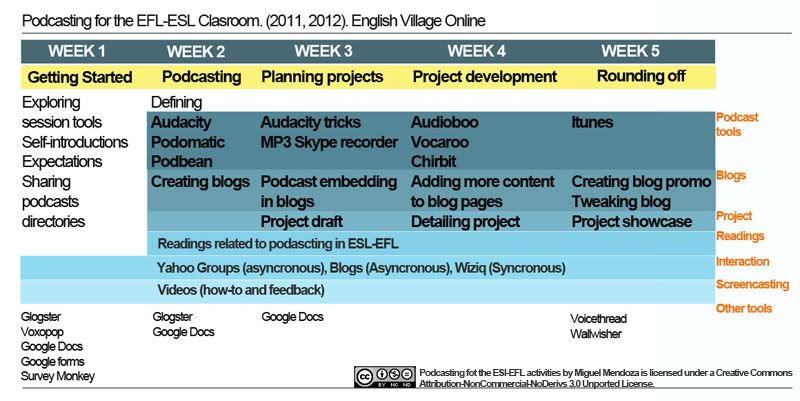
EVO sessions run for five weeks from January to February. The Podcasting for the ESL-EFL Classroom uses as a major platform the old, but really helpful and reliable Yahoo Groups. We use it to communicate, announce the start of each week session, answer participants’ queries and welcome newcomers. We also use it, as part of tasks, to share recordings and blogs as well as to keep a record of participants’ information and photos. The other platform we use is Blogger for the Session blog, the Activity blog and the reading blog. Participants use Blogger to create their own e-portfolios.

Activities or tasks have been planned in a graded manner, step by step sort of approach, to help participants become familiar with Audacity (the difficult way – Stanley, 2006) along with web-based podcast services (the easy way- Stanley, 2006). Creating blogs start from Week 2 all the way up to Week 5 when participants showcase them in the Podcasting Fair in Wiziq. Readings also start from understanding basic notions related to podcasting, how it is used in ESL-EFL (Weeks 2-4) and reviewing a pool of websites about podcasting collected by Wesley Fryer (Week 5). Furthermore, tasks are planned to try to encourage participants to work on their own without depending that much on the moderators especially after Week 2. Tutorials come in handy to explore and learn all the tools introduced all along the session. They are also used to clarify certain technical problems participants report in the Yahoo groups.  Here’s a quick overview on how the content is organized for this session. (Click on image to enlarge).


You can also here to read a description of each activities done during each week.


One of the things we have learned while moderating this session is that we should take into account:

1. Operating systems (e.g. Linux,  Windows, Leopard)
2. Browsers (Internet explorer, Firefox and Google Chrome)
3. PC and Mac users
4. Participants’ IT skills or expertise
5. Best time to plan synchronous sessions in international teaching training development sessions like EVO
6. Moderator’s support (e.g. immediacy , close support)

As for the evaluation, participants from the 2011 session talked about:

1. Variety of podcast tools
2. The support of  tutors and colleagues
3. Moderators’ Immediate response
4. Challenging course design, but achievable activities
5. Well-planned and selected activities per week
6. Progression of activities (from easy to demanding ones)
7. The potential of some other tools used in the session like Glogster, Blogger, Google docs, Voicethread among others
8. The use of tutorials to provide support and feedback
9. Confidence  to show other students and colleagues how to use podcasts
10. Having access to their own blogs (e-portfolio), session blogs and Yahoo groups even when the session is over.
11. Valuable synchronous sessions focused on review and not on empty chatting.
12. Broadening participants’ knowledge on podcast tools some participants thought they knew well.

Participants from the 2012 session talked about:

1. Their favorite tool being to our surprise Audacity. One of the participants, however, reported it is not advisable to use by young learners since it might be a bit hard to master.
2. Some other favorite podcasting tools like  Audioboo, Podmatic and Podbean.
3. Challenging course design, but achievable activities. Some participants suggested advertising it as a class.
4. Offering a session on videos as the natural next step after podcasting. They especially liked the video tutorials and how they showed a step by step way to create podcasts.
5. The potential of some other tools used in the session like Glogster, Blogger, Google docs, Voicethread among others
6. Well-planned and selected activities per week
7. The support of  tutors and colleagues
8. The follow up made by tutors on participants’ work each week
9. Progression of activities (from easy to demanding ones)

As for the moderators’ feedback, it was done using screencasting. This feedback is generally given during Week 5 before participants showcase their work. It is advisable to do this to provide this boost of confidence participants need before showcasing their work in a live session. This feedback consisted in reviewing each page from the blog’s participants providing advice on adding missing information and podcasts and the project itself. 

Watch this feedback for one of the participants from the 2011 session:


Watch this feedback for one of the participants from the 2012 session:


For a future session we should include some other tools like Sound Cloud and refer to the use of mobile technology to record podcasts.


Here are some participants' podcast samples made during 2011 and 2012:


Podbean (First recording using Audacity)

About me: Chris Jeffries (2011)


About me: Kerry (2012)


Podomatic:

Out my Window: Barbara Sakamoto (2011)


Out my Window: Janet Bianchini (2012)


MP3 Skype recorder:

Interview: Nina Liakos (2011)


Interview: Steve K (2012)


Audioboo

My mystery person: Maryanne Burgos (2011)

Canadian Mystery Person (mp3)

My Mystery person: Natasa Bozic Grojic (2012)

My Mystery Person (mp3)

Vocaroo

Recordings for the 2011 session are not available.

Questions to e-moderators: Sophia Danesino (2012)


Chirbits

Tongue twister: Jhon Conway (2012)


Tongue twister: Marie Helene (2011)


Blog Promo

Yuly Asención(2011)


Maja Dakic-Brkovic (2012)


Here is a participant' podcast blog (e-portfolio) from 2011 session:


Here is a participant' podcast blog (e-portfolio) from 2012 session:


To check out more great participants' blogs and podcast I invite you to visit the blogs for 2011 and 2012 sessions.

Tuesday, January 24, 2012

Learning Technologies (2011): some insights; my turn


British Council.
 Learning Technologies for the Classroom Course. Venezuela
In February 2011, I started moderating the Learning Technologies (LTs) for the Classroom online course. It is offered by the British Council as part of its teacher training development programs for EFL teachers in Venezuela. This course was one of two more offered during this year. The first one, the one delivered from February to March, became a pilot course offered mostly to public university teachers. The next two were offered to any EFL teacher interested in learning about integrating technology in the language classroom.

This course aims at:

1.    introducing participants to basic notions related to Learning Technologies (LTs).
2.    becoming familiar with LTs lessons and basic digital skills
3.    becoming aware of LTs issues like cyber-bullying
4.    reflecting about LTs and their potential application in the language classroom

The LTs course is delivered in Moodle and it is divided into 5 topics (Preparation, Using the Web,  Using Office Software, Projects, The Interactive Web). Each topic has got several subtopics called modules (17 in total) having a variable number of sections (from 7 to 12). In each section participants must do certain tasks or activities. The content was selected and added to the course by British Council people in London. It includes understanding what LTs are, basic web skills (searching, evaluating and selecting websites), becoming familiar with web-based lessons, Internet issues (copyright and cyber safety), Office software (Word and PowerPoint) the web 2.0 (blogs, wikis, podcasts, videos social networks) the future (broad mention on mobile learning and virtual worlds). This online course lasts 8 weeks including a break to catch up between weeks 4 and 5.

The e-moderator is responsible for:

A.    providing close support to participants especially during the first three weeks (helping them to have access to the platform, becoming familiar with topic sections, sorting out technical problems, making them feel “at home”)
B.    Sending weekly announcements/reminders about: 1. The start of a new week and content to work with; 2. synchronous sessions
C.    keeping track of “lost souls”.
D.    encouraging people to participate in forums.
E.    choosing external web tools that can be accessed even after the course have finished (e.g. blogs, tutorials in BliptTV , Slideshare)
F.    sending cell reminders to participants on activities to be done during the week.
G.    planning synchronous sessions every two weeks.
H.    recording tutorials (e.g. show how to use web tools or resize images)
I.    planning a last live session for participants to talk about a topic they liked form the course and how they would use it in their teaching context.
J.    sending reports/results to British Council people in Venezuela.

Even though participants are from Venezuela there are no F2F sessions at all. In previous online courses I moderated for the British Council at least the induction session was F2F. This time it was not the case. The induction session is online. During this session, participants are welcome and receive a Moodle walkthrough in Wiziq.

I will briefly write about three things I care about during the delivery of this course: teacher immediacy, number of activities per week, external web tools.

A.    Teacher immediacy:  I was concerned participants would feel they were only going to able to interact with me in forums, or instant messaging from Moodle. Chatting would be one way to communicate, but there’s no chat available in the module sections and the e-moderator is not allowed to add Moodle resources or activities at all. So I planned a one-hour Wiziq session every two weeks on Sunday mornings. This allows participants to ask questions or clarify doubts while the moderator reviews content in the virtual classroom.  Also I started to use the mobile phone to text weekly messages (e.g. reminders) and Mailvu to send video emails during the first weeks of the course.
B.    Quantity of activities: Participants are busy teachers. I believe too many activities in an online teaching development course could overwhelm participants or put them off a bit leading them to drop out; some of them may end up lurking or have an on and off participation. Also, this may encourage participants to request for (frequent) extensions to finish their tasks. In the LTs course, participants were supposed to do about 12 to 16 activities per week (two modules).  Fortunately, after getting the go ahead from a British council representative in Venezuela, I created a PDF document showing participants activities they MUST do, Optional activities and the ones they could skip. In some cases, some activities  checked as MUST were edited a bit. So, for example, in some MUST activities participants were asked to skip forums or wikis especially when there were too many in a module. (See sample content distribution)

C.    External web tools: I think it is important to try to keep external resources that allow participants to go back to them anytime they want especially when the course is over and there’s no longer access to it (mostly paid courses). These external resources (ERs) can be created by participants or the e-moderator himself/herself to: 1. review (websites, audio files, videos, Wiziq recorded sessions); 2. reflect (blogs); 3. showcase their work (blogs).  These ERs can be blogs or wikis (to reflect or as eportfolios), video tutorials uploaded to sites like BliptTV or Youtube,  recorded synchronous Wiziq sessions. Some others that may not be stored for long but can be accessed directly from participants own resources (personal email) along the session could be Mailvu (messages sent to the participants mail inbox) and mobile phones ( texting participants instantly). Next course I am planning to add Diigo so they can  bookmark websites easily and check them out every time they want.

Now I will describe how this was considered for each of the three courses delivered during 2011. It varied somewhat especially for the first two courses.

Pilot group (cohort February-April 2011)

In this first course:

1.     Reducing the number of activities depended on topic and type of task. This allowed participants to see tasks attainable and enjoyable, not a race against time to accomplish them before the deadline. A PDF document was created and also uploaded to the Plenary Forum showing participants MUST , OPTIONAL and SKIP activities.
2.    Mobile phone was introduced as an instant way to keep in touch with participants during the week.
3.    Blogs created in Blogger were used to reflect on learning process. The e-moderator created a blog himself to collect and showcase participants’ blogs.
4.    Tutorials were recorded to: a) show participants how to have access to Moodle; b. use certain webtools, c. show how to solve technical problems.
5.    Three Wiziq sessions were delivered during this course: the first one to welcome participants; another one during week 4; the last one during week 8.

Second group (Cohort June-August 2011)

1.     Content distribution (PDF document with modules and activities per week) was updated.
2.     Mailvu was introduced as a tool to show them who their tutor was, to make announcements or clarify doubts during the first two weeks of the course.
3.    Synchronous sessions in Wiziq were offered every two weeks. 4 sessions in total not including the welcome session delivered in Wiziq as well. This time, for the last Wiziq session, participants were asked to choose a topic from the modules and tell why it was important / interesting for him/her and how it was related to his/her teaching context. 


4.    The cell phone was used to send reminders and announcements along the course.
5.    Participants wrote heir reflections in Blogger (Here's a sample: Miguel Galea).
6.    More tutorials were recorded to: 1. show how a web tool was used; 2, how to deal with certain technical issues. A compilation of tutorials were made available at the end of the course.

Their group (Cohort October –December 2011)

Remains the same as cohort June-August 2011. Mailvu was not used due to technical problems with audio. 

Here are sample presentations made by Ronny Piñero and Marisela Ferrer during the last wiziq session in December 2011. 


Marisela Ferrer: Podcasting


Here's the lesson plan for this presentation.

Ronny Piñero: Twitter


Here's the lesson plan for this presentation.


Note: The reference about "external tools" is based on a webinar given by Henry Chero in CLED2011.
Related Posts Plugin for WordPress, Blogger...