Friday, August 05, 2011

A writing helper: MacMillan Dictionary

Lately  I have been writing more entries for my blog and posts in the forums for courses I delivered for the British Council. As a non-native English speaker, sometimes I'm in doubt about the right word or phrase to use. Also, when I am rehearsing for my presentations or recording tutorials and doubt strikes me again, I turn to one of the best online dictionaries I have come accross: The MacMillan Online Dictionary.

What Do I like about it? First, its slick and sort of "minimalist" presentation caught my fancy. Secondly, the easy way to search words/phrases and all the info I can get including pronunciation.

Lay-out and design

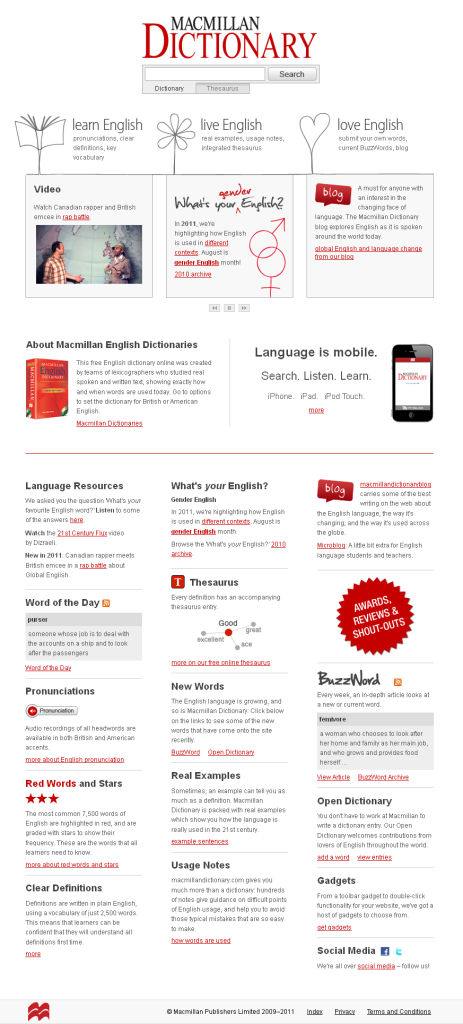
Have a peek at this image, isn't that a page you feel like you are going to get what you want? The lay-out, in my humble opinion, is clean and simple. Information is not cluttered. It goes from top to bottom. From Search engine to dictionary features/content. You can clearly identify three sections;

1. Search engine (dictionary/Thesaurus)
2. Main web page dictionary information (learn english, live english, love english)
3. MacMillan dictionaries and mobile apps.
4. In detailed-dictionary features and content for entry words

The design is as clean and simple as the lay-out. Red, black and white as the main colour for fonts, headers and drawings. Fonts are easy-to-read. Few pictures or drawings. All this makes navigation easy and pleasurable. 

What do I use this dictionary for?


1. look up word's meaning, its pronunciation, collocations and maybe prasal verbs.
2. make sure I am using the word appropriatley. You can get info about cultural notes, word stories, offensive words an metaphors.
3. check how frequent a word is. It is useful for my ESP courses at the university.
4. find synonyms in the Thesaurus.

This is really helpful when I write a blog entry or a post in forums. Also, it's really handy when I rehearse for presentations and hesitate a bit on how a certain word is pronounced.

Searching for words

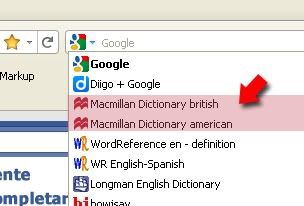
Searching is easy. You can either search in the MacMillan webpage or add it to your list in the Firefox serach bar and get definitions in a flash from its tool bar.


There are some other gadgets you can sue to search for words in a breeze in this online dictionary.
Other features I love:

Another nice feature is that words like "snap" has got sound effect. I think it is easier to click on a sound effect icon and make our students listen to it than us trying to ackwardly impersonate the sound.

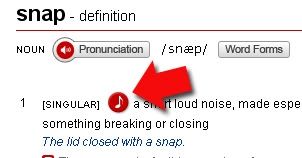
Also you can check both British or American definitions and also get some info about word forms.

It has got an interesting video like What's Your English.

How can you use it in the classroom?

1. For writing compositions, look up words and check their meaning, collocations, use, word form, phrasal verbs.
2. For reading, to look up for words and check their meanings.
3. For speaking to check pronunciation (althought chekcing pronounciation for reaidng can be useful as well).

Thursday, August 04, 2011

What a ride! The RSCON3 2011

For the second time, I participated as a presenter in an online conference thanks to the unstoppable & tireless Shelly Sánchez Terrell. As usual, Shelly DMed in Twitter and asked me if I was interested in participating in RSCON3. She suggested I could talk about the Flip videos (as I did last October in the 3rd Virtual Round Table Conference). I was a bit hesitant since, as we all know, Flip videos won't be sold anymore by Cisco. However, the always clear-sighted Shelly went something like: "Come on, Miguel, Flip videos sales will still be available for some time and besides you can always translate what you can do with them into smartphones or digital cameras)". With such powerful argument, how could I have said "No". So I started to look into the reasons why Cisco had made such dreadful and, in my opinion, unintelligent move; finding out about some other "Flip" alternatives; updating images and content from previous presentation; and trying to keep in mind the Five W´s (Graham Stanley). So a revisited version was born: "Flip cams see; smartphones and digital cameras do" (View recording here).


On the other hand, someone I met during this event and who definitely deserves all my respect is Clive Elsmore. What a way to organize the event from welcoming presenters to scheduling presentations and offering training sessions in Elluminate. My admiration also goes to the rest of the organizers: Shelly Terrell, Ina Chia, Mark Barnes, Christopher Rogers, Lisa Dabbs, Melissa Tran, Cecilia Lemos, Jerry Blumerganten and Kelly Tenkely. Amazing A-team


An icing to the cake in this event was asking presenters to record themselves giving self-intro and briefly talking about their presentations. I had fun and started to come to terms to seeing myself talking in a video and that's quite an achievement!!!!

Having a moderator in our sessions is also as important as the presenter himself/herself in online environments. He/she formally starts the session; maybe provides a few rules to follow (Netiquette); keeps reminding people about how the session goes; encourages people to participate; announces the end of the session; or just simply (which is enough) provides support by letting the presenter know he/she is not alone. I was lucky Cecilia Lemos moderated my session and to top it all off Shelly Terrell filled in for Cecilia towards the end of the session.   


Now what about the presenters? I'd like to reflect a bit on the responsabilities the presenter has got in online events like the RSCOn3 and how fulfilling these resposabilities can help organizers bring the event to successul completion. That is, I have always heard a lot about the responsabiltities of the organizers and moderators, but what about ours to help things get done smoothly, properly and on time. Here's what I think our responsabilities are:


1. reply emails from organizers in a timely manner. It is so awful when a presenter accepts to participate in an event and replies messages from organizers days (or even weeks) later. This I believe affects having on time schedules and conference website.

2. provide info about presentations as well as bios, pictures, adding oneself to guest maps, recording videos within deadlines.
3. participate in training sessions for web confererencing platform chosen for the event (Adobe Connect, Elluminate and Wiziq). Do not trust your experience as presenter! Technology can give you some quite unpleasant, unexpected surprises.

4. contact your moderator as soon as you can to let her/him know what you plan to do. 

5. keep your presentations within the time frame shown in the schedule.

6. rehearse your presentation even if you are an "experienced" presenter.

7. try not to clutter your slides with too much text! People login to listen to you not to "listen" to the slides. A good example of Powerpoint presentations, from the sessions I attended in RSCON3, are Steve Wheeler and Dave Hodgson.

8. thank  the organizers and/or the people who invited you to participate in the online event.

9. try to share your presentations using, for example, Slideshare.


Finally, one of the things I like  from online events like this one, is how comfortably you can choose what you want to see either from home or your office; from your PC/laptop or smartphone. No one notices if you have get absent for a while (grabbing a cuppa of coffee or answering the phone). And even if you miss a piece of an interesting presentation you can always watch the recording. How great is that! Can you do that with F2F presentations? very few, I think. This RSCON3 made me think a bit about the differences/similarities between online and F2F conferences. Here they are. Feel free to add more.


I have got to end this short entry by thanking Shelly for "pushing" me to participate in this kind of online events. I'd rather go unnoticed, but these opportunities may happen once in a lifetime.


Hope next time I have more time to help maybe as moderator! Kudos RSCON3 organizers! What a  ride in three fantastic days!

Sunday, July 24, 2011

Reform Symposium 2011 (July 29th, 30th & 31st)

In a few days, nearly 8000 educators from over 40 different countries are expected to attend a free 3 day virtual conference, The Reform Symposium, #RSCON3. This free award-nominated e-conference is going to take place on July 29-31st, 2011. Participants can attend this online conference from the comfort of their homes or anywhere that has Internet access. This amazing conference provides educators new or currently active on social networks the opportunity to connect with educators and professionals in the field of education worldwide. With over 12 Keynotes, 80 presenters, and 3 keynote panel discussions you are bound to be inspired!
We would like to thank the incredible organizers- Shelly Terrell, Kelly Tenkely, Chris Rogers, Lisa Dabbs, Melissa Tran, Clive Elsmore, Mark Barnes, Ian Chia, Cecilia Lemos, Jerry Blumengarten, and Kyle Pace- and Steve Hargadon of Classroom 2.0 and The Future of Education online communities for making this incredible conference possible.
Related Posts Plugin for WordPress, Blogger...