Showing posts with label vocabulary. Show all posts

Tuesday, August 09, 2011

Mantweet, Womantweet

Yesterday I came accross this study on daily patterns of life in Twitter messages when reading Michael Rundell's post (You say "lovely", I say "great" - How "Beatlish" can that be). It shows according to gender how frequent a word is used. This study was carried out by the Language, Interaction an Computation Laboratory at the University of Trento, Italy.

The website Tweetolife has got a "lovely", "cute" webpage to experiment a bit with word or phrase queries and learn, for example, how frequently men say "fabulous" and when they use it or how frequently women say "dude" and when they use it as well.

To try this out, go to: Tweetolife and click on "Gender Differences" and submit a word.


You will get a graphic showing how frequent men and women use this word:


If you hover the cursor over the blue bar for men, you will read 24%. Now if you do the same over the pink bar for women, you will get 76% (mmm...blue and pink; how stereotypical that is). If you click on "Detailed Query" you will find when men and women use this word.  Apparently men use it when talking about sports  while women when talking about food!!!.


Queries are based on thousands of tweets from Twitter collected by the university of Edinburgh. This gives an interesting use to Twitter to research about vocabulary or grammar use for example. Would this king of web tools would be useful for teachers? learners? Would this be useful when writing dialogues? or any other type of writing task? Do you think it has got any application in the language classroom or it is just an interesting tool to explore about, say, gender stereotypes in class?

Friday, August 05, 2011

A writing helper: MacMillan Dictionary

Lately  I have been writing more entries for my blog and posts in the forums for courses I delivered for the British Council. As a non-native English speaker, sometimes I'm in doubt about the right word or phrase to use. Also, when I am rehearsing for my presentations or recording tutorials and doubt strikes me again, I turn to one of the best online dictionaries I have come accross: The MacMillan Online Dictionary.

What Do I like about it? First, its slick and sort of "minimalist" presentation caught my fancy. Secondly, the easy way to search words/phrases and all the info I can get including pronunciation.

Lay-out and design

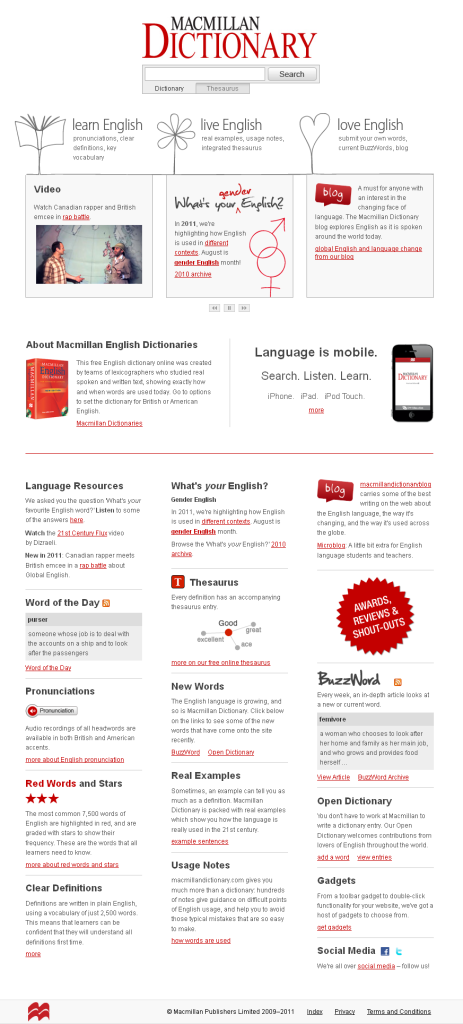
Have a peek at this image, isn't that a page you feel like you are going to get what you want? The lay-out, in my humble opinion, is clean and simple. Information is not cluttered. It goes from top to bottom. From Search engine to dictionary features/content. You can clearly identify three sections;

1. Search engine (dictionary/Thesaurus)
2. Main web page dictionary information (learn english, live english, love english)
3. MacMillan dictionaries and mobile apps.
4. In detailed-dictionary features and content for entry words

The design is as clean and simple as the lay-out. Red, black and white as the main colour for fonts, headers and drawings. Fonts are easy-to-read. Few pictures or drawings. All this makes navigation easy and pleasurable. 

What do I use this dictionary for?


1. look up word's meaning, its pronunciation, collocations and maybe prasal verbs.
2. make sure I am using the word appropriatley. You can get info about cultural notes, word stories, offensive words an metaphors.
3. check how frequent a word is. It is useful for my ESP courses at the university.
4. find synonyms in the Thesaurus.

This is really helpful when I write a blog entry or a post in forums. Also, it's really handy when I rehearse for presentations and hesitate a bit on how a certain word is pronounced.

Searching for words

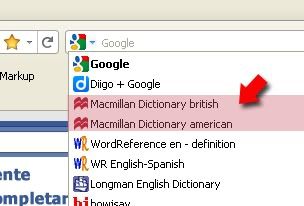
Searching is easy. You can either search in the MacMillan webpage or add it to your list in the Firefox serach bar and get definitions in a flash from its tool bar.


There are some other gadgets you can sue to search for words in a breeze in this online dictionary.

Other features I love:

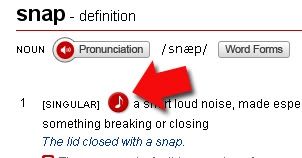
Another nice feature is that words like "snap" has got sound effect. I think it is easier to click on a sound effect icon and make our students listen to it than us trying to ackwardly impersonate the sound.


Also you can check both British or American definitions and also get some info about word forms.

It has got an interesting video like What's Your English.

How can you use it in the classroom?

1. For writing compositions, look up words and check their meaning, collocations, use, word form, phrasal verbs.
2. For reading, to look up for words and check their meanings.
3. For speaking to check pronunciation (althought chekcing pronounciation for reaidng can be useful as well).
Related Posts Plugin for WordPress, Blogger...